heroImage: “/images/blog-heros/how-to-secure-docker-containers-in-production.png”
How to secure Docker containers in production
ActiveState’s 2026 report surveyed 250 North American DevSecOps leaders. Every respondent called containerization critical to production strategy, and 82% said they were likely to have suffered at least one container-related breach in the previous 12 months. The same report found that 91% considered limited visibility into container components their biggest security blind spot.
A Docker image scan is one control, not a production-security program. It tells you what is inside an image; it doesn’t tell you which privileges, mounts, networks, daemon access, or runtime behaviors that image receives.
So secure Docker in production in risk order: harden the image, constrain deployment, protect the daemon and host, detect runtime behavior, and make those controls the easiest path for developers. The goal is a secure default developers can consume without opening a security ticket for every routine update.
SentinelOne cites 85% for container-related incidents in 2023, but that older vendor-reported figure uses a different timeframe and shouldn’t be combined with ActiveState’s survey.
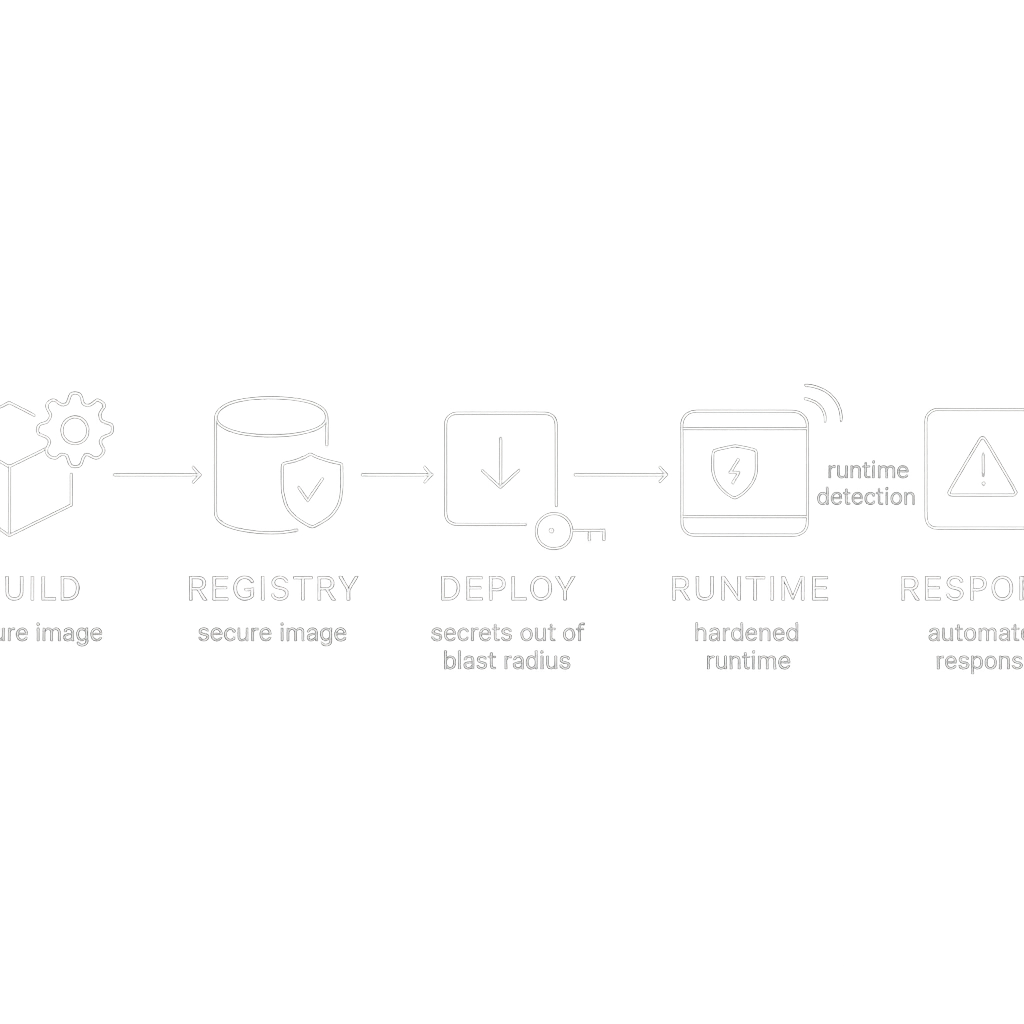 And the alt text reads: Container security lifecycle: build, registry, deploy, runtime, and response phases with ActiveState 2026 survey showing 82% of organizations experienced a container security breach.
In this article
- Why a Docker security checklist is not enough
- Secure the image before it reaches your registry
- Make insecure runtime settings difficult to ship
- Keep secrets and the Docker socket out of the blast radius
- CIS finds drift; it doesn’t prove safety
- Add runtime detection because scans cannot see behavior
- Build a golden-image path developers will use
- Pick tools by the control you are missing
- Turn the controls into a recurring production loop
Why a Docker security checklist is not enough
A checklist flattens different risks into one pile: image vulnerabilities, excessive capabilities, exposed sockets, weak host config, and suspicious processes need different controls at different points.
ActiveState reports 90% still use lightly modified public images, yet 77% trust curated catalogues more than public registries. That contradiction points to a workflow problem: a catalogue requiring security approval for every patch becomes a queue developers route around.
So follow this order. Each stage closes a different failure mode:
- Build a small, traceable image.
- Store and verify the exact artifact.
- Reject unsafe deployment settings.
- Reduce what the host and daemon can expose.
- Watch live behavior and assign a response owner.
- Automate updates and exceptions.
Treat the survey numbers as directional, not proof.
Secure the image before it reaches your registry
Take a small orders-api service built from a public Python image. Its first Dockerfile might look like this:
FROM python:latest

WORKDIR /app
COPY . .

RUN apt-get update \
    && apt-get install -y build-essential curl \
    && pip install -r requirements.txt

ENV DATABASE_PASSWORD=change-me

CMD ["python", "app.py"]
The moving latest tag breaks reproducibility. Compilers and package managers stay in the runtime image, the process runs as root, and the password persists in image history.
Use a multi-stage build. Pin the base to a version or digest from your supported-base process. Choose a minimal, distroless, Alpine, or scratch runtime where the app supports it. Smaller runtimes contain fewer packages, though distroless images make interactive debugging harder. Document your debugging method before adopting one.
This example uses a virtual environment so the dependency path is explicit:
FROM python:<pinned-build-version> AS build

WORKDIR /build
RUN python -m venv /venv
ENV PATH="/venv/bin:$PATH"

COPY requirements.txt .
RUN pip install --no-cache-dir -r requirements.txt

COPY app.py .

FROM <pinned-minimal-python-runtime>

WORKDIR /app
COPY --from=build /venv /venv
COPY --from=build /build/app.py .

ENV PATH="/venv/bin:$PATH"
USER 10001:10001
CMD ["python", "app.py"]
Use .dockerignore to keep local configuration, credentials, tests, and build output out of the build context:
.git
.env
tests/
__pycache__/
*.pem
The Dockerfile establishes user and contents; CI should enforce them. Scan at build time and in CI with Trivy, Grype, Clair, or Anchore. Policy — not raw CVE count — decides which findings block release: weigh severity, exploitability, reachability, and package necessity.
Sign and verify the image before deployment — Cosign is one option. Record source revision, build job, digest, and signer as release evidence.
Restrict who can push to production repositories. Retain immutable tags or deploy by digest from trusted, signature-verified sources.
The corrected orders-api removes DATABASE_PASSWORD from the image and reads the runtime secret shown below.
latest is not a versioning strategy. “It passed the scan once” is not evidence that a production artifact remains safe.
Make insecure runtime settings difficult to ship
The original Compose service also needs correction:
services:
  api:
    image: orders-api:latest
    ports:
      - "8080:8080"
      - "9090:9090"
    volumes:
      - /var/run/docker.sock:/var/run/docker.sock
    environment:
      DATABASE_PASSWORD: change-me
It publishes an unnecessary port and mounts the Docker socket. It passes a credential as an environment value. It has no resource limits. The root filesystem remains writable.
Use this as a starting Compose profile for a stateless API; test each setting against the service rather than copying it as universal policy:
services:
  api:
    image: registry.example.com/orders-api@sha256:<approved-digest>
    expose:
      - "8080"
    user: "10001:10001"
    read_only: true
    cap_drop:
      - ALL
    security_opt:
      - no-new-privileges:true
    mem_limit: 512m
    cpus: "1.0"
    pids_limit: 256
    tmpfs:
      - /tmp
expose keeps port 8080 available to other services on the Compose network without publishing it directly on the host. Put TLS at a reverse proxy or load balancer if that is your architecture. If the API must be internet-facing itself, define that boundary explicitly and protect it there.
Docker’s defaults are a starting point, not a production policy — exploitability depends on the workload, host, network, and attacker.
Apply the profile through Compose review, deployment automation, or Kubernetes admission:
- Use a dedicated user. Set
USERin the Dockerfile and confirm the application works without root. Rootless Docker or another rootless runtime adds a useful boundary where compatibility permits. - Drop capabilities first.
--cap-drop ALLremoves the container’s default capability set; add back only capabilities the workload demonstrably requires. - Make the root filesystem read-only.
--read-onlyblocks ordinary writes to the image filesystem. Give the process a narrowly scoped temporary filesystem or volume instead. - Bound resources. Set
--memory,--cpus, and--pids-limit. These limits bound one important form of resource exhaustion; they don’t prevent every denial-of-service path. - Constrain network exposure. Publish required ports and attach only required networks.
Rootless operation and least privilege can break software that binds privileged ports. Document exceptions with a compensating control and an expiry date.
Keep secrets and the Docker socket out of the blast radius
A later image layer can hide a secret from the final filesystem while leaving the earlier layer in image history. Keep DATABASE_PASSWORD out of the Dockerfile and source repository.
For orders-api, a Docker Compose deployment using a mounted secret could look like this:
services:
  api:
    image: registry.example.com/orders-api@sha256:<approved-digest>
    secrets:
      - database_password

secrets:
  database_password:
    external: true
The application must read the secret file rather than expect DATABASE_PASSWORD:
from pathlib import Path

database_password = Path(
    "/run/secrets/database_password"
).read_text().strip()
Environment variables are acceptable only when the runtime protects them from logs, crash reports, and untrusted siblings; otherwise use a mounted secret or Vault/AWS Secrets Manager. Rotate credentials when exposure is suspected.
The Docker socket deserves a hard prohibition in ordinary application services:
volumes:
  - /var/run/docker.sock:/var/run/docker.sock
A socket mount delegates daemon control: a compromised container can expand the incident to the host. Remote Docker API access needs TLS, network restriction, and authentication — never expose an unauthenticated daemon.
CIS finds drift; it doesn’t prove safety
The CIS Docker Benchmark gives you a repeatable baseline for Docker host, daemon, and container configuration. CIS is useful precisely because it is boring; treating its score as proof of safety is the dangerous part.
Docker Bench for Security audits many of those areas. Read the command carefully before running it — it mounts sensitive host paths and the Docker socket, so run it only in an approved administrative environment:
docker run -it --net host --pid host --cap-add audit_control \
  -v /var/lib:/var/lib \
  -v /var/run/docker.sock:/var/run/docker.sock \
  -v /usr/lib/systemd/system:/var/lib/systemd/system \
  -v /etc:/etc \
  --label docker_bench_security \
  docker/docker-bench-security
Adapt the mounts to your environment and security process. Don’t paste this into an unfamiliar host as though it were a harmless diagnostic.
Treat a failed check as a control gap. Record the affected host or container, the exception rationale, the compensating control, and an expiry date.
CIS covers host, daemon, and container configuration; dependency scanning, runtime detection, and incident response need separate controls. Run the audit on a schedule and after host changes so it catches drift, not a ceremonial score.
Add runtime detection because scans cannot see behavior
A scanner examines an artifact. Runtime detection examines what a live workload does. As vcso.ai puts it, “The scan that catches a vulnerable package in a container image at build time doesn’t catch the threat that only materializes at runtime.”
A clean build can still be abused after deployment, for example through a newly discovered flaw or an unexpected request path. Runtime tools observe syscalls, processes, and network flows, then alert when behavior diverges from policy. Falco is an open-source example of syscall-level detection.
Start with rules tied to known application behavior. Watch for unexpected shells. Monitor writes to sensitive paths and new outbound connections. Track capability-sensitive operations. Tune the rules with the service owner. Detection nobody responds to is telemetry, not protection.
Under Kubernetes, admission controllers reject violating images, users, capabilities, host mounts, or resource settings before pods start; runtime monitoring watches what happens after admission. For standalone Docker or Compose, enforce equivalent checks in deployment automation or host policy.
Assign response ownership before enabling alerts:
- Identify the workload, image digest, host or node, process, and network activity.
- Isolate or stop the workload according to its service-impact procedure.
- Rotate credentials that may have been reachable.
- Preserve logs and relevant evidence.
- Rebuild from a clean supported base and redeploy.
- Add a preventive deployment or runtime rule for the failure.
Require useful telemetry, explainable alerts, and a response owner — no single product catches every attack.
Build a golden-image path developers will use
A catalogue that waits for security approval on every patch is a queue developers will bypass.
The contradiction repeats across surveys: people value the safer route, but the route often takes too long.
Give the catalogue:
- a small set of language and service bases;
- a named owner and update SLA;
- pinned versions and digests;
- automated rebuilds when base packages change;
- scanning, signing, and provenance;
- copyable usage examples;
- a self-service request path for new bases;
- exceptions with an owner, reason, compensating control, and expiry.
A new-base request should trigger an automated build that tests, scans, signs, and publishes. Security reviews policy and exceptional cases. It shouldn’t manually inspect every routine patch.
Let teams consume approved images without a ticket. When a base changes, publish the new digest, affected packages, and a migration window. If a team needs a different system library, make the request path visible and time-bound.
A catalogue won’t eliminate every public-image use. It can reduce ungoverned exceptions by making the supported option easier to adopt than an improvised FROM line.
Pick tools by the control you are missing
Buy the control you’re missing. Choose based on the gap it closes, not the quality of its demo. The following maturity paths are examples drawn from CiphersSecurity’s 2026 comparison, not independent performance rankings.
| Team situation | Starting examples | Question to test |
|---|---|---|
| Small team with an established CI pipeline | Trivy plus Falco | Can you scan and sign releases, route runtime alerts, and export evidence without creating a new operations queue? |
| Kubernetes-heavy team needing enforcement | Sysdig or Aqua | Does the product enforce policy at admission and runtime for your cluster, and can the response workflow identify the owning team? |
| Large multi-cloud team with fragmented ownership | Wiz, Prisma Cloud, or CrowdStrike | Does it map assets to owners across your estate, show policy gaps at useful depth, and produce remediation evidence? |
These are starting points, not endorsements. A small team should first enforce image scanning, signing, deployment policy, and a lightweight detector. A Kubernetes platform needs admission and runtime controls early because many teams share the cluster. A fragmented multi-cloud estate may benefit from a CNAPP after it has defined ownership and baseline controls.
Docker Scout and SentinelOne Singularity Cloud Security are other market examples. A single CNAPP console can display gaps beautifully while leaving them untouched. Test each candidate against your registry, deployment path, identity model, policy enforcement point, alert routing, and evidence export.
Turn the controls into a recurring production loop
Use this implementation sequence:
- Inventory the estate. Find images, registries, Docker hosts, daemon endpoints, socket mounts, root containers, privileged settings, and production limits.
- Remove high-impact weaknesses. Eliminate baked secrets, unnecessary root, privileged mode, excessive capabilities, and unapproved host mounts.
- Make artifacts reproducible. Pin the bases and use multi-stage builds. Scan in CI, sign the images, then deploy by digest.
- Enforce deployment policy. Require supported users, dropped capabilities, read-only filesystems, resource limits, approved networks, and trusted registries.
- Audit hosts. Run Docker Bench against the CIS Docker Benchmark on a schedule and track exceptions.
- Detect live behavior. Add syscall, process, and network monitoring with a named response owner.
- Automate maintenance. Rebuild supported bases and retest applications. Republish signed images, notify consumers, and expire exceptions.
This order is a strong default, not a substitute for threat modeling your workloads. Measure exploitability, privilege requirements, and internet exposure before changing the sequence for a high-risk service.
ActiveState reports that 100% of respondents were likely to use AI or automation to prioritize vulnerabilities, while 95% expected intelligent remediation to become standard by 2026. Use that help to rank findings, suggest dependency or Dockerfile changes, open remediation pull requests, and summarize affected workloads.
Treat AI output as a proposed change; the service owner still owns the test, approval, provenance, and rollback. AI can draft a useful pull request. It cannot establish that the application still works or that the resulting artifact is trustworthy.
For orders-api, generate this release record from CI metadata and deployment configuration, then compare it on every release:
digest | user | capabilities | writable paths | reachable networks | detector | response ownerIf a release cannot answer those seven fields, stop the deployment and fix the evidence path before adding another security product.